
How do I mount the Open Air?
This guide explains how to mount your AirGradient Open Air.
Before mounting, we strongly recommend reading the placement guidelines. Bad placement = bad AQ data.
Once you’ve picked a good location, come back here to mount the device.
Before installing the monitor permanently, do a quick test run.
-
Power it on.
-
Connect it to the dashboard: To ensure that connectivity is working, we recommend checking the AirGradient dashboard to confirm the monitor is reporting data.
-
If it’s not reporting data yet, don’t mount it permanently before troubleshooting.
Mounting Methods
The AirGradient Open Air comes with a mounting bracket on the back of the device designed to allow flexibility during the mounting process. There are different mounting methods available.
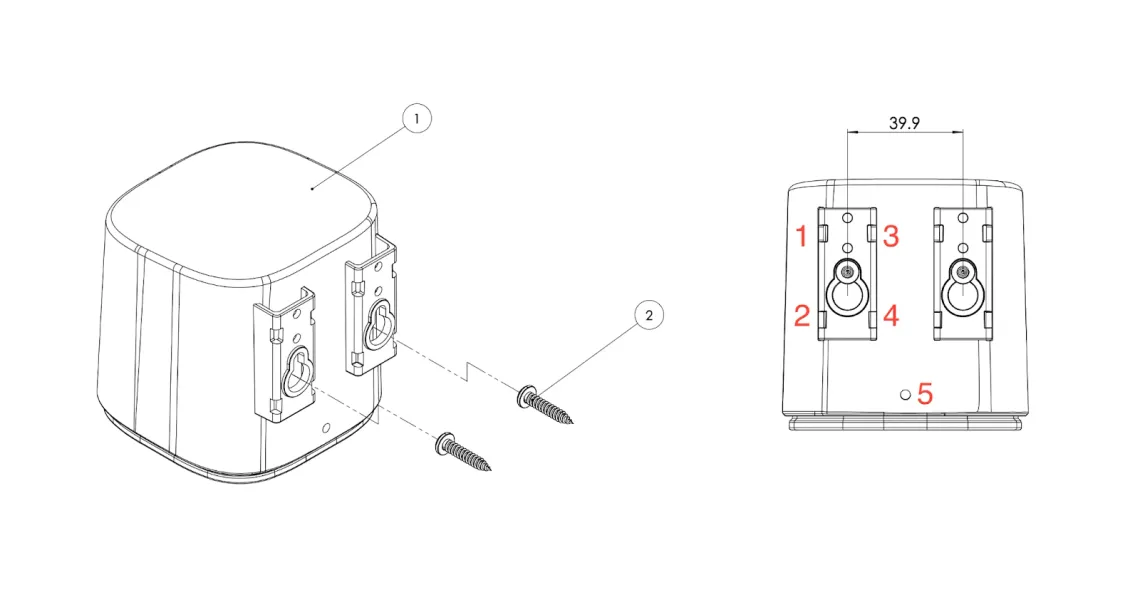
For most installations, the included cable ties, sturdy string, or wires can be passed through the four holes on the sides of each bracket (marked 1-4 on the image above). This method is best suited for mounting the device on poles, fence posts, or any other object to which the monitor can be tied.
When installing the device on a flat surface where cable ties or wire can’t be used, we recommend using the two large screw mounts (located 39.9mm apart) and drilling two M4 screws into the flat surface with the screw heads sticking out. The monitor can then be mounted on these heads and pushed down to ensure a solid mount. When removing the monitor, push it up before pulling it off the screws.
For additional security, the Open Air features an additional hole for screws at the bottom (marked 5 on the image above) of the monitor. This is intended to be used as a theft deterrent and will ensure the monitor can’t be quickly removed from its mounting position.
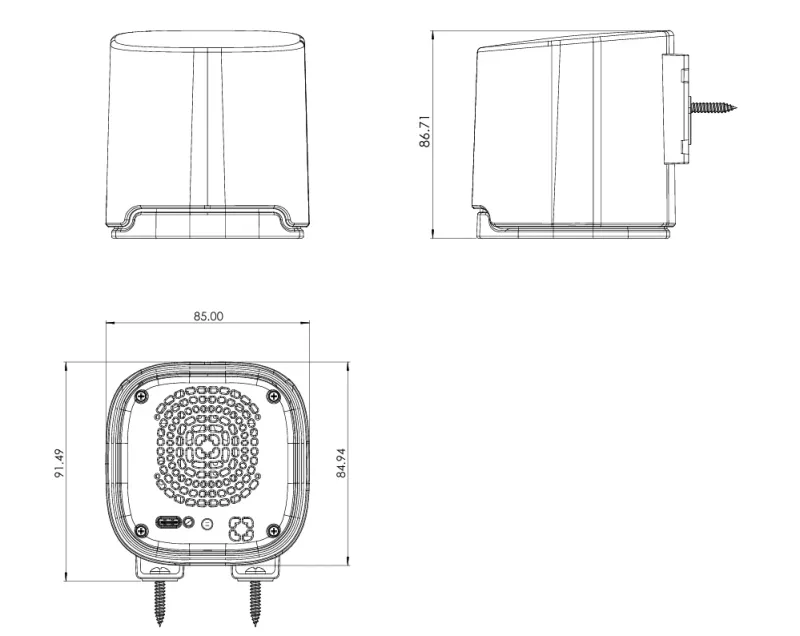
Below is a diagram showing the full dimensions of the Open Air and how it will look when mounted with M4 screws. Please note the screws should first be screwed into the surface which you want to mount the monitor on.
Cable Management
Loose cables cause outages.
-
Secure the cable with tape or zip ties
-
Keep the cable off the ground
-
Ensure the USB plug cannot be accidentally pulled out
The cable itself is weather-resistant, but the USB connectors are not. Protect them.
Final Checks
Before walking away:
-
Device is firmly mounted
-
Vent is facing down and unobstructed
-
Power cable is secure
-
Data is visible on the dashboard
If all four are true, you’re done.
FAQs
Do I need to maintain the monitor?
Not regularly. But occasionally, you may need to:
-
Clean the vents
-
Remove dust or insects from the PM sensor
So, mount the device where you can reach it later.
What surfaces can I mount it on?
Walls, poles, fences, railings.
Avoid surfaces that heat up in direct sunlight.
Can I move the monitor later?
Yes. Just follow the same mounting and placement rules at the new location.
Should I test before final installation?
Yes. Always. Temporary mounting + dashboard check = fewer problems later.